Rounding Calculator – Accurately Round Numbers Online for Free
Introduction
Working with numbers often looks simple until precision becomes important. Whether you are a student solving math problems, an accountant preparing financial reports, or a professional handling scientific data, rounding numbers incorrectly can lead to inaccurate results. Even a small rounding mistake can change conclusions, calculations, and decisions.
This is where a rounding calculator becomes an essential tool. Instead of guessing how many decimals to keep or manually applying rounding rules, this tool does everything automatically and correctly. With just a few clicks, you can round numbers to the exact precision you need.
The free rounding calculator online is designed for anyone who wants fast, reliable, and error-free rounding. You can round decimals, whole numbers, and negative values using different rounding modes such as standard rounding, floor, ceiling, and significant figures. The tool works instantly and does not require signup, downloads, or technical knowledge.
In this detailed guide, you will learn how to use a rounding calculator, understand why correct rounding matters, explore its features, and discover who should use it. This article is written as a teaching resource, not a sales page, so you can fully understand the tool and use it with confidence.
What Is a Rounding Calculator?
A rounding calculator is an online mathematical tool that rounds numbers according to predefined rules and user-selected precision levels. It removes confusion and ensures consistent results across different calculations.
Instead of manually applying math rules, the calculator processes the input number and returns a clean, rounded output based on your settings.
Purpose of a Rounding Calculator
The main purpose of a rounding calculator is to:
Improve numerical accuracy
Save time
Reduce human error
Provide consistent results
It is especially useful when working with:
Long decimal numbers
Financial values
Scientific data
Educational exercises
Key Features Explained in Detail
Decimal Precision Control
You can choose how many decimal places to keep, from zero to eight. This is useful for:
Currency values
Measurements
Grades and scores
Multiple Rounding Modes
This tool supports:
Standard rounding (half-up)
Floor rounding (always down)
Ceiling rounding (always up)
Significant figures rounding
Each mode serves a different real-world purpose.
Scientific Notation Support
For very large or very small numbers, scientific notation helps keep values readable and manageable.
Copy and Use Anywhere
The result can be copied instantly and pasted into documents, spreadsheets, or reports.
Why This Rounding Calculator Is Better
Compared to manual rounding or basic calculators:
It handles edge cases correctly
It supports advanced rounding logic
It works instantly on any device
It requires no installation
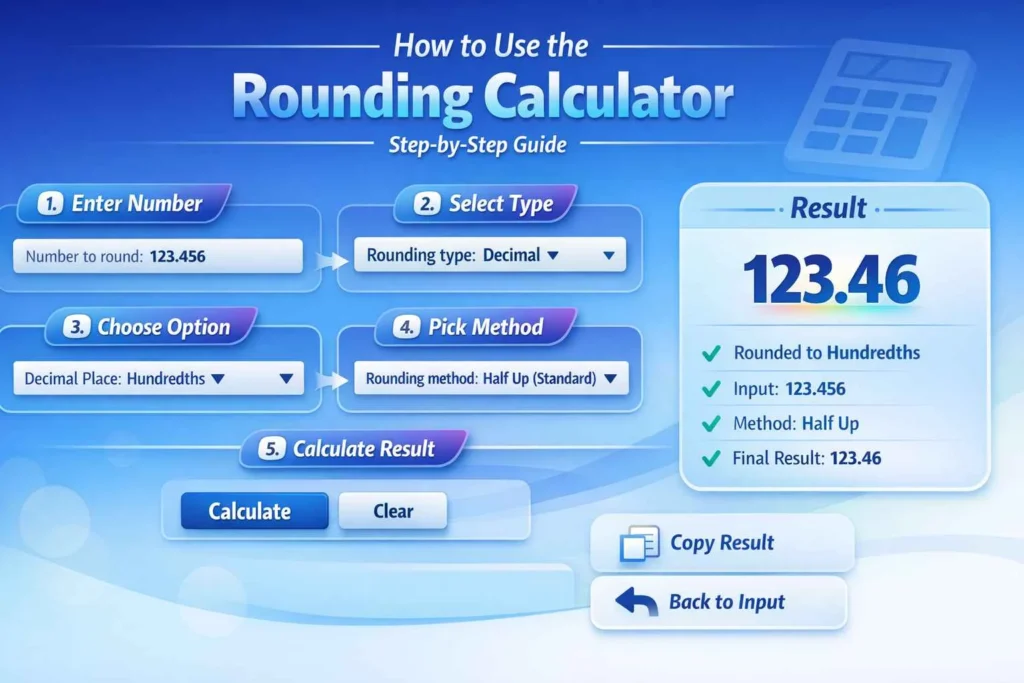
How to Use the Rounding Calculator (Step-by-Step)
The Advanced Rounding Calculator lets you round numbers accurately using decimals, whole numbers, or fractions, with multiple rounding methods. Follow these simple steps:
Step 1: Enter the Number
Locate the “Number to round” input box at the top of the calculator.
Type the number you want to round.
Example:
123.456or0.004567.
Step 2: Select Rounding Type
Click the “Rounding type” dropdown menu. You have three options:
Decimal – Round by decimal places (tenths, hundredths, etc.).
Whole number – Round by place value (ones, tens, hundreds, etc.).
Fraction – Round to the nearest fraction (1/2, 1/4, 1/8, etc.).
Step 3: Choose Decimal/Whole/Fraction Option
After selecting the type, choose the specific option from the second dropdown:
Decimal: Tenths, Hundredths, Thousandths, Ten Thousandths, Hundred Thousandths, Millionths.
Whole Number: Ones, Tens, Hundreds, Thousands, Millions.
Fraction: 1/2, 1/4, 1/8, 1/16, 1/32, 1/64.
This defines exactly how the number will be rounded.
Step 4: Select Rounding Method
Choose the rounding method from the “Rounding method” dropdown:
Half Up – Standard rounding (rounds 0.5 up).
Half Down – Rounds 0.5 down.
Half Even – Banker’s rounding (rounds to the nearest even number when 0.5).
Ceil – Rounds up to the nearest value.
Floor – Rounds down to the nearest value.
Truncate – Removes decimals without rounding.
Step 5: Calculate
Click the “Calculate” button.
The calculator will hide the input panel and display the result page with:
Big, bold gradient result.
Step-by-step explanation:
Rounding type applied
Original input
Factor used
Method applied
Final result
Step 6: Copy Result (Optional)
Click the “Copy Result” button to copy the rounded number to your clipboard.
You can now paste it anywhere you need.
Step 7: Back to Input
Click the “Back” button to return to the input panel if you want to round another number.
You can also click “Clear” to reset all fields.
Tips for Using the Calculator
For decimal rounding, tenths = 1 decimal place, hundredths = 2 decimals, etc.
For whole number rounding, tens = nearest 10, hundreds = nearest 100, etc.
For fraction rounding, only the nearest fraction will be calculated.
Common Mistakes to Avoid
Over-rounding values
Choosing the wrong rounding mode
Ignoring decimal accuracy
Benefits of Using a Rounding Calculator
Saves Time
Manual rounding takes effort and increases the chance of mistakes. This tool gives instant results.
Improves Accuracy
The calculator follows proper mathematical rules every time.
Free and Accessible
This is a rounding calculator without signup, making it cost-effective and convenient.
Beginner-Friendly
No math expertise is required to use it correctly.
Extra Modern Advantages
Mobile responsive
Clean interface
Fast performance
No distractions
Who Should Use This Rounding Calculator?
Anyone who works with numbers can benefit from this tool, including:
Students learning math and science
Teachers explaining rounding concepts
Accountants preparing financial data
Engineers handling precise measurements
Researchers managing experimental results
Business owners reviewing reports
Helpful Internal Tools (Recommended)
You may also find these tools useful:
FAQs About Rounding Calculator
Is this rounding calculator free to use?
Yes, it is completely free with no hidden costs.
Can I use it on mobile devices?
Yes, it works perfectly on phones and tablets.
How accurate is this rounding calculator?
It uses precise mathematical algorithms for reliable results.
Does it support scientific notation?
Yes, scientific notation can be enabled with one click.
Can I round negative numbers?
Yes, both positive and negative numbers are supported.
Is installation required?
No installation is needed.
Is this tool suitable for professionals?
Yes, it is designed for both academic and professional use.
Are there any limits on usage?
No, you can use it unlimited times.
Conclusion & Call to Action
Rounding numbers correctly should not be difficult or time-consuming. With this free rounding calculator, you can achieve accurate results instantly without worrying about formulas or manual errors.
Whether you are a student, teacher, or professional, this tool simplifies numerical rounding and improves confidence in your calculations.
👉 Start using the rounding calculator now and round numbers accurately online with ease.